Anamika Dey, editor
Updated October 22, 2026. Checked against Google’s Gemini Apps Privacy Hub (last updated October 19, 2026).
What This Article Covers
|
It’s late. You’re tired. You paste an angry draft message to your landlord into Gemini and ask it to sound calmer. Maybe it’s a bank statement you want help budgeting, or a lab report you don’t fully understand. Gemini answers in seconds and you move on with your night.
A week later a small thought shows up: where did all of that actually go?
So, is Google Gemini private? Not as private as most people assume, at least on a personal Google account with the default settings. Google saves your chats, can use them to improve its AI, and lets trained reviewers read a sample of them. You can switch some of that off. Not all of it. Everything below comes from Google’s own Gemini Apps Privacy Hub, which was last updated on October 19, 2026.
Is Google Gemini Private? The Short Version
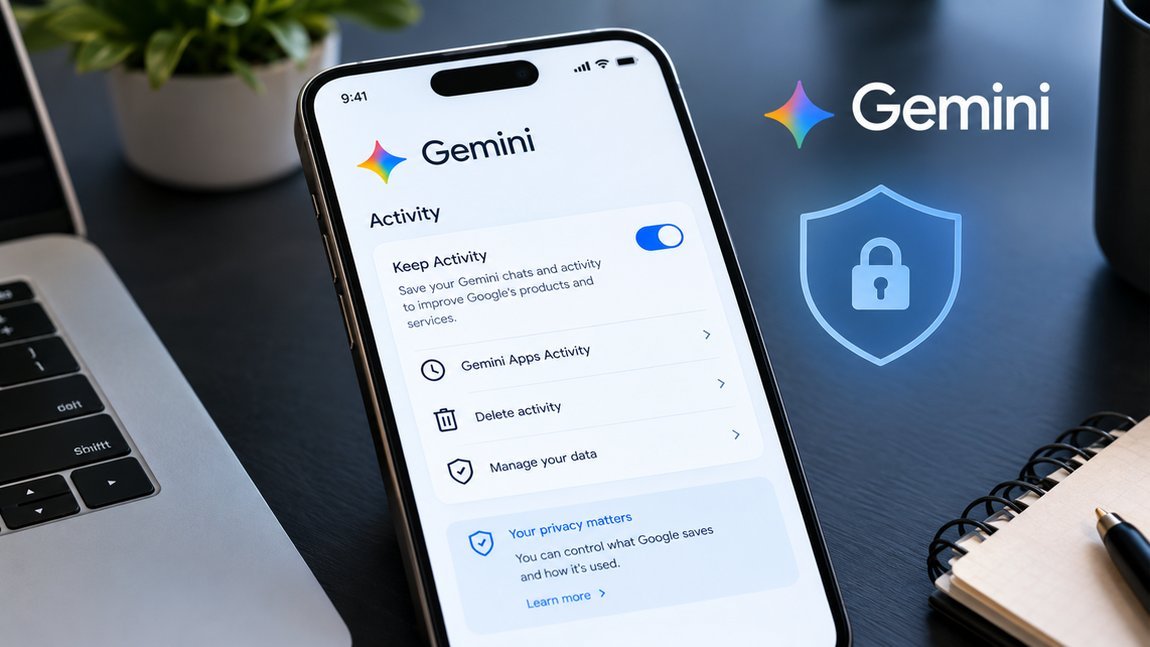
On a personal account, adults get a setting called Keep Activity switched on by default. That one setting decides most of what happens to your chats. While it’s on, your conversations land in your Gemini activity, Google can use them to develop and improve its services (that includes training its AI models), and a subset gets read by human reviewers.
Turn it off and things get better, but not completely. Google still holds your chats for 72 hours, still uses them to respond to you and to protect its service, including with help from human reviewers, and a few details stick around longer than you’d expect. We’ll get to those.
One naming note. Older guides, and some Google pages, call this setting Gemini Apps Activity. Google now labels the switch Keep Activity. It’s the same control, so don’t panic if you see both names.
If you read our guide on whether ChatGPT is private, the same question applies here. The settings are different though, so check each tool on its own.
How to Turn Off Gemini History (Keep Activity)
This is the part most people came for, so here it is up front. These steps are for a personal Google account on a computer.
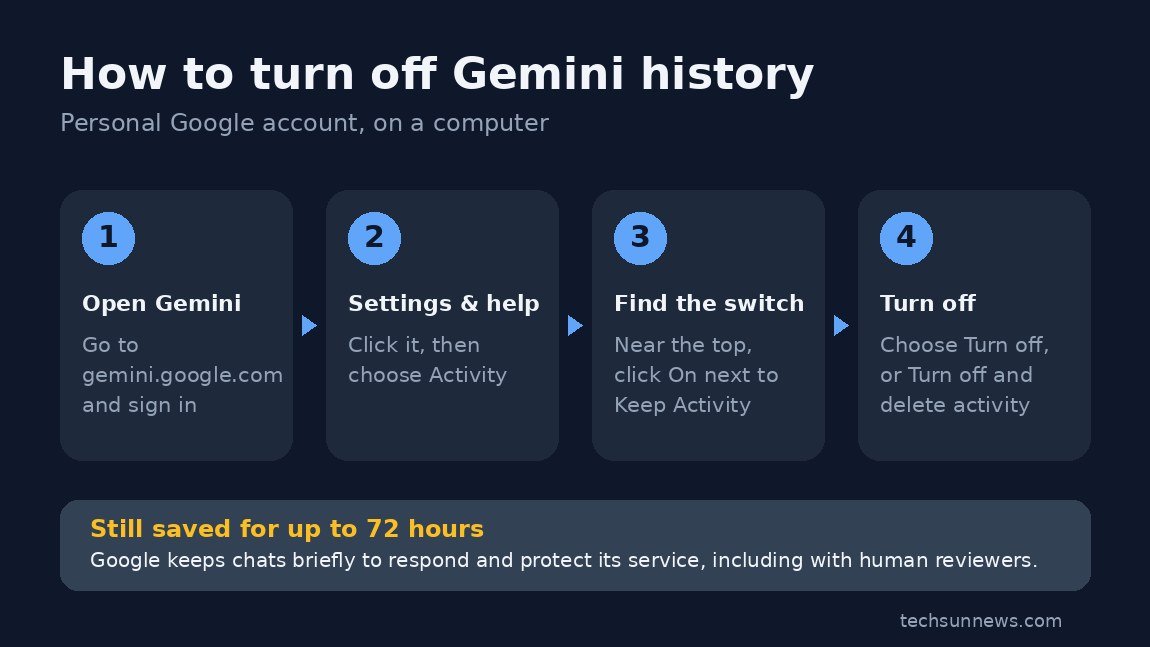
- Go to gemini.google.com and sign in.
- Click Settings & help, then Activity. You can also jump straight to My Activity for Gemini.
- Near the top, click On, then choose Turn off or Turn off and delete activity.
On a phone, the My Activity link works in any browser, which saves you hunting through app menus.
Read this before you flip the switch: turning Keep Activity off is not the same as Gemini not seeing your chats. Google says it still uses your chats to respond to you and to help protect Google, its users and the public, and that this includes help from human reviewers.
What might you give up? It depends on your account and device, but Google’s help pages currently say that, at this time, connected apps like Google Workspace are unavailable while Keep Activity is off, and that the Tasks feature only works with it on. Google lists a few apps that still work: device assistance, Gemini Notebook, Messages, Phone and WhatsApp. Exactly what stays available can vary by device and feature (calling and messaging, for example, aren’t available on smartwatches when it’s off), so check the Connected Apps page for your own account. Either way, privacy here can come with a real price.
If Gemini is your default assistant on Android, our piece on switching back to Google Assistant is worth a read too.
What Does Gemini Save About You?
More than just your typed questions. According to Google’s notice, the list looks like this:
- Your prompts, spoken or typed, and the tasks you ask it to do
- Files, photos, videos and screens you share with it
- Gemini Live transcripts (audio and video are treated separately, more on that below)
- Feedback you send
- What Gemini writes back, including code, images and chat summaries
- Details about your device, apps and browser
- Your location, at least a general area taken from your IP address or the Home and Work addresses on your Google account
- Info pulled from connected apps like Gmail or Google Photos, if you’ve connected them
Google also admits Gemini can switch on by accident, for example when it mishears “Hey Google.” When that happens it treats the input like a normal request. That list is long for a reason: Gemini is built to run through your Google account, not to sit in a separate box.
Can People at Google Read Your Gemini Chats?
Some can, yes. Google says a subset of chats is reviewed by human reviewers, including trained reviewers from its service providers. They check whether Gemini’s answers were low quality, inaccurate or harmful, and they suggest better ones. Chats are also reviewed for safety and to catch breaches of Google’s terms.
Google says chats are disconnected from your account before they go to service providers. That’s a real safeguard. It doesn’t make the content anonymous, though. If you type your full name, phone number or home address into a prompt, that text travels with it. So Google’s own advice is blunt: don’t enter anything confidential that you wouldn’t want a reviewer to see.
It’s only a subset. You just can’t tell in advance which of your chats ends up in it.
One more detail. If you let Gemini operate apps on your Android phone through screen automation, it takes screenshots, and with Keep Activity on those can be reviewed too. Google says plainly not to type login or payment details into Gemini chats. Its notice also warns that Gemini can make mistakes with these tasks, like making purchases or sharing your data with third parties unexpectedly. That’s exactly why attacks like prompt injection matter more once an AI can act, not just answer.
Does Google Use Your Gemini Chats to Train Its AI?
With Keep Activity on, yes. Google says your activity is used to provide, develop and improve its services, and that explicitly covers training generative AI models.
Turn it off and Google says your future chats won’t be used to train its models, with one exception: if you send feedback, that feedback plus the last 24 hours of your chats and anything inside them (uploads, for example) can be used.
Audio is handled differently. Your Gemini Live audio, video and screen shares aren’t used to improve Google’s services by default. The text transcripts of those chats fall under Keep Activity though, so they follow the normal rules.
On ads: Google says your Gemini chats aren’t being used to show you ads, and that it would clearly tell you if that changes.
Also check Memory. If it’s on, Gemini may use sensitive details you shared in past chats to personalise your answers. A Temporary Chat keeps a conversation out of that.
How Long Does Google Keep Your Gemini Chats?
It depends on which bucket your chat lands in:
| Situation | How long Google keeps it |
|---|---|
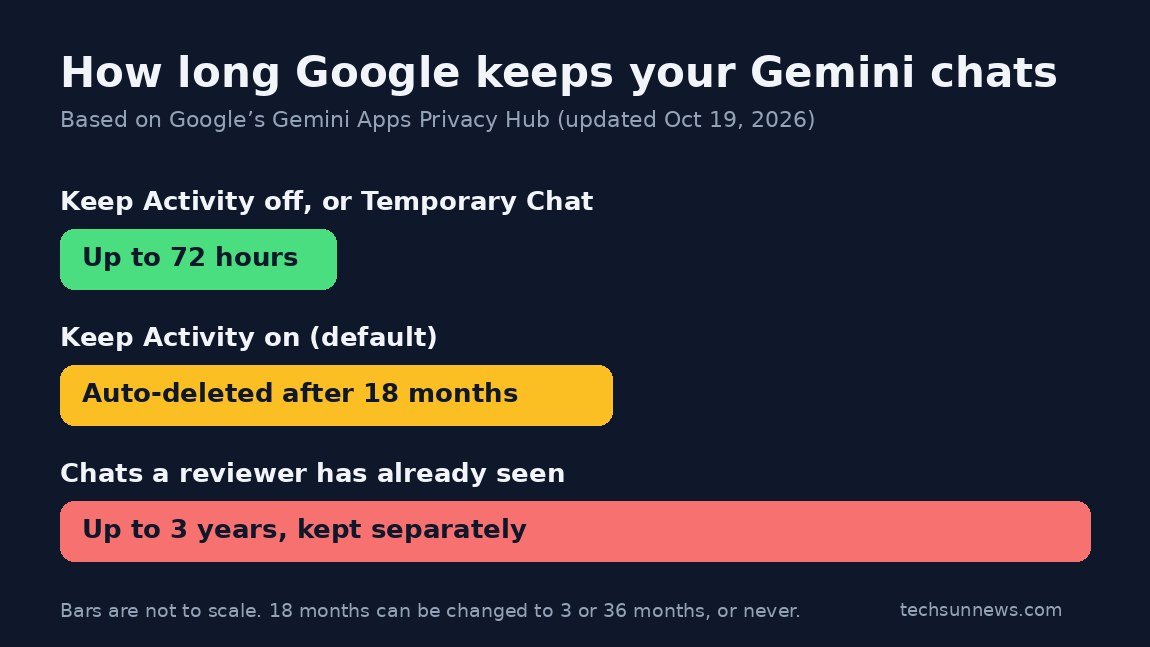
| Keep Activity on (the default) | Auto-deleted after 18 months. You can change that to 3 or 36 months, or never. |
| Keep Activity off, or a Temporary Chat | Up to 72 hours, saved with your account. |
| Chats a human reviewer has already seen | Up to 3 years (that’s Google’s upper limit), stored separately, even if you delete your activity. |
| Feedback you submit, plus the conversation attached to it | Up to 3 years, disconnected from your Google account. |
The third row is the one that surprises people. Deleting your activity removes your copy. A chat that a reviewer has already seen is stored separately, not linked to your account, and Google says it can be kept for up to three years. That’s a ceiling, not a promise that every reviewed chat sits there for the full period, and Google doesn’t say how many chats get reviewed.
How to Delete Your Existing Gemini Chats
Go back to the same Activity page. From there you can:
- Click Delete above your activity and pick Last hour, Last day, All time or a Custom range
- Delete a single day or a single item with the delete icon next to it
- Change auto-delete by clicking Deleting activity older than … months and choosing 3, 18 or 36 months, or Don’t auto-delete activity
If you’d rather not think about this again, 3 months is the shortest auto-delete option. Two catches from Google’s help page: deleting a shared chat doesn’t delete its public link (remove that separately under Your Public Links), and deleting Gemini activity doesn’t touch data held by other Google services. Full details are on Google’s Manage & delete your activity page.
Is Gemini Private If You Turn History Off?
More private, yes. Fully private, no. Even with Keep Activity off:
- Your chats are still saved with your account for up to 72 hours so Gemini can respond and Google can protect its service
- Google still uses chats to respond to you and to protect Google and its users, including with help from human reviewers
- Chats that were already reviewed before you switched it off aren’t pulled back; Google says reviewed chats are kept separately for up to three years
- Other Google settings, like Web & App Activity, Search Services History and Timeline, are separate and may keep saving location and other data
So if you tell a friend “I turned it off, so Google has nothing,” that’s not accurate. You’ve stopped the long-term saving and the AI training, which is still worth doing. Just keep the claim honest.
How to Use Gemini More Privately
You don’t have to quit Gemini. A few habits go a long way:
- Use Temporary Chat for anything sensitive. In the Gemini web app, click Temporary chat next to New chat (Google’s instructions). Google says these chats don’t appear in your activity or recent chats, aren’t used to train its AI models, and are kept with your account for 72 hours. Like the Keep Activity‑off case, Google still uses them to respond to you and protect its service, including with help from human reviewers. Availability can differ on work or school accounts.
- Keep the really personal stuff out of prompts. ID numbers, full addresses, medical records, passwords.
- Check Connected Apps and Memory now and then. Switch off whatever you don’t actually use.
- Secure the Google account itself. Everything Gemini touches sits behind that login, so a strong, unique password matters. A password manager makes that painless.
- Using Gemini for work or school? Those accounts follow different rules, set by your administrator. Google publishes a separate Workspace privacy hub for them.
Still choosing between assistants? Our ChatGPT vs Gemini vs Claude vs Grok comparison looks at how the four stack up.
| The Bottom Line
Is Google Gemini private? Private enough for recipe ideas, less so for anything you’d hate to see leaked. The defaults favour Google’s AI development. The controls exist, but they sit a few clicks deep, and switching history off costs you some features. Turning Keep Activity off helps, but Google still processes chats for safety and service delivery, including with human reviewers. If you don’t need connected apps, turn it off anyway. Use Temporary Chat for sensitive questions. And remember that chats a reviewer has already seen can be kept for up to three years, even after you delete your activity. |
Frequently Asked Questions
Can Gemini see my Gmail and Google Photos?
Only if you connect them. Gemini can look up info in your emails or photos through Connected Apps, and Google says it handles that data under the same Gemini notice. You can disconnect any app in Connected Apps settings. Google’s help pages currently say Google Workspace apps are unavailable in Gemini while Keep Activity is off, though availability of other connected apps can vary by device.
Is Gemini safe to use for confidential work information?
On a personal account, Google itself says not to enter confidential info you wouldn’t want a reviewer to see. Work and school accounts follow separate terms controlled by your Workspace administrator, so ask your IT team before pasting company data in.
If I delete my Gemini chats, are they gone for good?
Not entirely. Your copy is removed from your account, but chats a human reviewer has already seen are kept separately for up to three years. Data in other Google services isn’t deleted either.
| Your Turn
Did you know Gemini history was switched on by default before reading this? Have you turned it off, or do you need the connected apps too much to give them up? Tell us in the comments. |
| Editor’s Observation
What stood out while I was reading Google’s hub is how much the privacy choice is tied to features. Per Google’s current help pages, Keep Activity off means no Workspace connection and no Tasks. That’s not a bug, it’s the trade. Before you flip any switch, decide what you actually use Gemini for. If it’s quick answers, turn it off and stop worrying. If it runs half your day through Gmail and Calendar, you’re choosing convenience, and it’s better to know that than to find out later. — Anamika Dey, editor |
Sources
- Gemini Apps Privacy Hub, Google
- Manage & delete your activity in Gemini Apps, Google
- Use Gemini Apps (Temporary Chat), Google
- Generative AI in Google Workspace Privacy Hub, Google